

Changing the cPanel language
Ce contenu n’est pas encore disponible dans votre langue.
The cPanel interface supports multiple languages, allowing you to work in the language you’re most comfortable with. This article explains how to change the display language for your cPanel account.
Steps to Change the Language
Section titled “Steps to Change the Language”-
Log in to cPanel
Section titled “Log in to cPanel”- If you’re unsure how, see our guide: Logging in and out of cPanel.
-
Go to Preferences
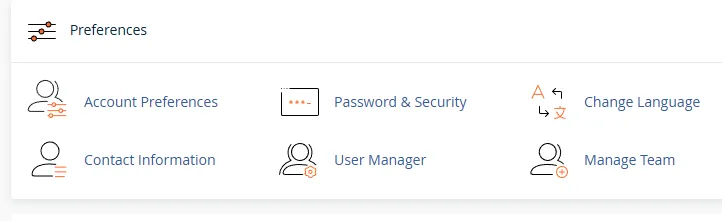
Section titled “Go to Preferences”- On the cPanel Home screen, scroll to the Preferences section.
- Click Change Language.
-
Select Your Language
Section titled “Select Your Language”- In the Select a Language drop-down list, choose your preferred language.
- Available options include English, French, Spanish, German, Portuguese, Italian, Russian, and many more.
-
Apply the Change
Section titled “Apply the Change”- Click Change.
- The interface will immediately reload in the language you selected.
Cette page vous a-t-elle aidé ?
Merci pour votre retour.