

Transferring a Domain to Ruachost
If you already own a domain name registered with another registrar, you can transfer it to Ruachost. When you transfer a domain, its billing and administration move to Ruachost, allowing you to manage both your hosting and domain in one place.
Before You Begin
Section titled “Before You Begin”To ensure a smooth transfer, make sure the following conditions are met:
- Domain is unlocked: Contact your current registrar if you need help unlocking it.
- Contact information is current: The Administrative and Technical contacts listed in WHOIS must be accurate.
- WHOIS privacy is disabled: Temporarily turn off privacy protection so you can receive the transfer verification email.
- EPP/Auth Code: Obtain the EPP code (also called AuthInfo code, transfer secret, or EPP key) from your current registrar.
- Domain age: Some domains cannot be transferred within 60 days of initial registration or a previous transfer.
Steps to Transfer Your Domain to Ruachost
Section titled “Steps to Transfer Your Domain to Ruachost”- Log in to your Ruachost Client Area.
- Go to Domains → Transfer Domain.
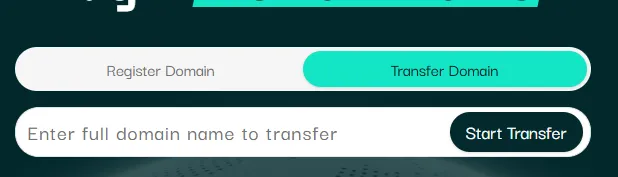
- Enter the domain name you want to transfer and click start transfer.
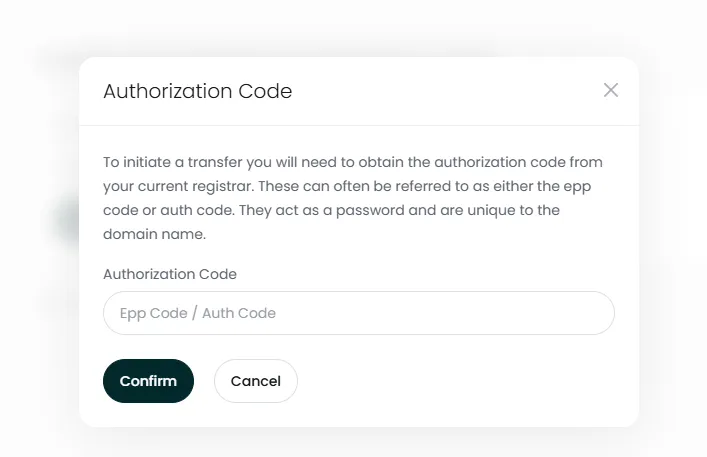
- Enter the EPP/Auth Code from your current registrar.
- Select your billing term (1 year, 2 years, etc.).
- Complete payment to initiate the transfer.
Verification Process
Section titled “Verification Process”- The Administrative Contact for the domain will receive an email requesting approval of the transfer.
- Once approved, the transfer typically completes within 2–7 days, depending on the current registrar.
- If approved promptly, transfers may complete in as little as 2–4 days.
Special Cases: Non-US Domains
Section titled “Special Cases: Non-US Domains”Some country-code domains (ccTLDs) have additional requirements:
- For example, .uk domains require a “push and pull” process. You must ask your current registrar to retag the domain to Ruachost’s IPS tag.
- Other ccTLDs may have unique transfer rules. Contact your current registrar for details.
If a Transfer Fails
Section titled “If a Transfer Fails”If your transfer is unsuccessful, you have two options:
- Retry the transfer: Open a support ticket in your Ruachost panel and request a reattempt.
- Update nameservers instead: If you don’t want to transfer, you can simply point your domain’s nameservers to Ruachost to use our hosting services.