

Creating categories in WordPress
Categories in WordPress help organize your posts into topics, making it easier for visitors to navigate your site. On ruachost.com, you can create categories directly from the WordPress dashboard.
Why Use Categories?
Section titled “Why Use Categories?”- Organize posts into logical sections.
- Improve site navigation and user experience.
- Enhance SEO by grouping related content.
- Allow readers to quickly find posts on specific topics.
Steps to Create a Category
Section titled “Steps to Create a Category”-
Log in to WordPress with an administrator account.
-
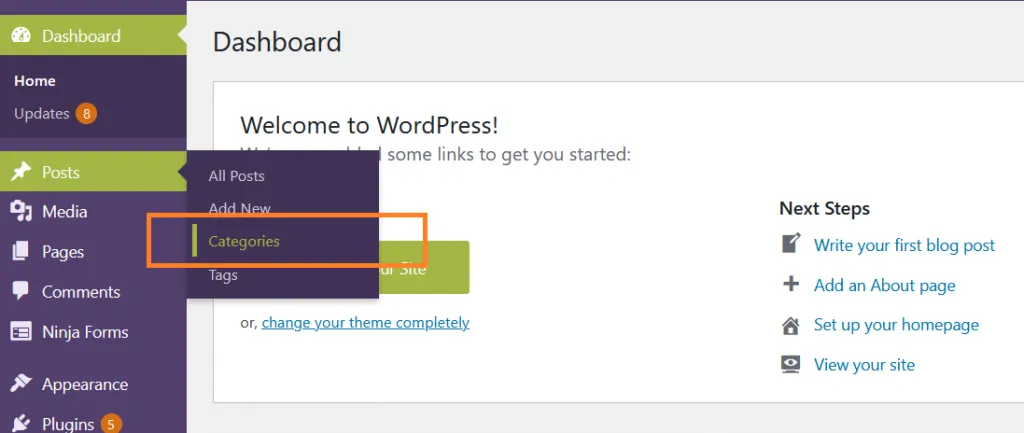
In the dashboard, go to Posts → Categories.
-
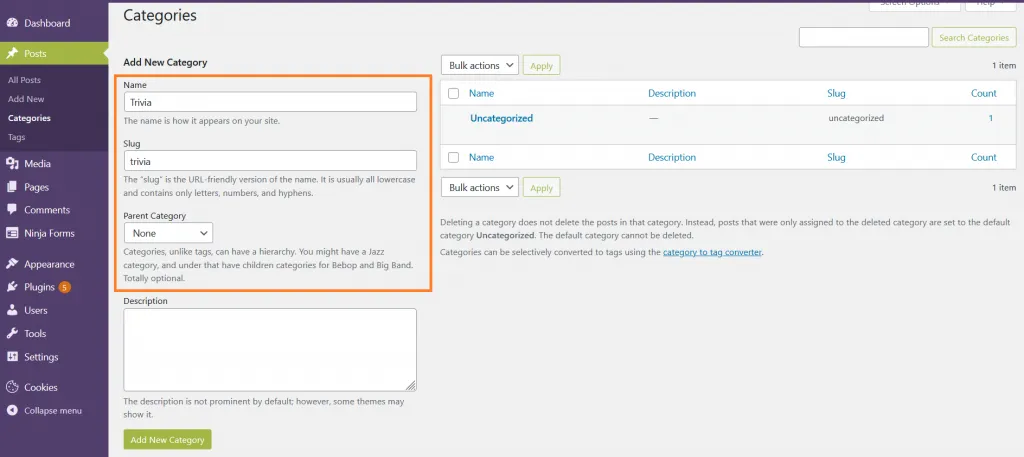
Fill in the following fields:
- Name → The category name (e.g., “News”).
- Slug → The URL-friendly version of the name (e.g.,
news). - Parent Category → Select if this should be a subcategory under another category.
- Description → Optional text explaining the category.
-
Click Add New Category.
-
The new category will appear in the list on the right.
✅ You can now assign posts to this category when creating or editing them.
Alternative Method (Quick Add)
Section titled “Alternative Method (Quick Add)”- When writing a new post, expand the Categories box in the right sidebar.
- Click Add New Category.
- Enter the name and optionally select a parent category.
- Click Add New Category → It will be available immediately.
Important Notes
Section titled “Important Notes”- Use categories for broad topics; use tags for more specific keywords.
- Avoid creating too many categories, keep your site structure simple.
- Categories can be displayed in menus, sidebars, or footers using widgets.
More information
For more information about categories and subcategories, please visit: https://wordpress.org/support/article/posts-categories-screen/