

Verifying site ownership with Google
To use Google services like Search Console, Analytics, or AdSense, you must first verify that you own your domain. This proves to Google that you control the site you’re claiming.
Prerequisite
Section titled “Prerequisite”- Create a Google Search Console account Google Search Console account for your domain: Google Search Console Welcome Page.
Verification Methods
Section titled “Verification Methods”You only need to complete one of the following methods:
1. HTML File Upload
Section titled “1. HTML File Upload”- Download the verification file from Google Search Console.
- Upload it to the root directory of your website.
- Confirm by visiting
https://yourdomain.com/filename.html. - Click Verify in Search Console.
2. HTML Tag
Section titled “2. HTML Tag”- Copy the
<meta>tag provided by Google. - Paste it into the
<head>section of your homepage. - Save and publish the changes.
- Click Verify in Search Console.
3. DNS Record (TXT or CNAME)
Section titled “3. DNS Record (TXT or CNAME)”- Log in to your hosting control panel (e.g., cPanel).
- Go to Zone Editor under Domains.
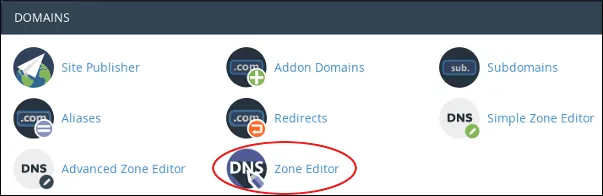
- Add a new TXT record with the unique value provided by Google.
- For subdomains, you may use a CNAME record.
- Wait for DNS propagation (can take up to 24 hours).
- Click Verify in Search Console.
4. Google Analytics Tracking ID
Section titled “4. Google Analytics Tracking ID”- If you already use Google Analytics, you can verify ownership with your tracking ID.
- Ensure the Analytics code is installed on your site.
- Click Verify in Search Console.
Best Practices
Section titled “Best Practices”- Use DNS TXT record verification for long‑term reliability.
- Keep your verification file or tag in place, removing it may cause verification to fail later.
- If you migrate hosting, re‑verify your site.