

Using cPanel to configure a domain for Google Workspace
Google Workspace (formerly G Suite/Google Apps) lets you use Gmail, Calendar, Docs, and other Google services with your own domain. To make this work, you must configure your domain’s DNS records in cPanel.
Step 1: Sign Up for Google Workspace
Section titled “Step 1: Sign Up for Google Workspace”-
Visit Google Workspace → click Get started.
-
Create your account and specify your domain name.
-
After signup, verify your domain ownership in the Google Admin Console.
- Verification methods include TXT records, CNAME, or uploading an HTML file.
- See https://support.google.com/a/topic/9196?hl=en&ref_topic=3540977. ⚠️ You cannot activate Google Workspace services until verification is complete.
Step 2: Configure DNS Settings in cPanel
Section titled “Step 2: Configure DNS Settings in cPanel”1. Update MX Records
Section titled “1. Update MX Records”- Log in to cPanel → Zone Editor → Manage.
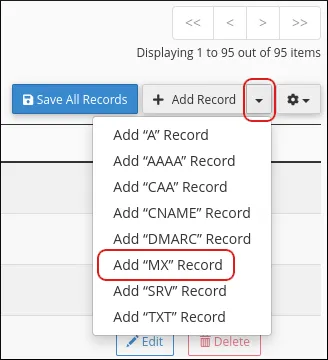
- Delete existing MX records.
- Add new MX records depending on signup date:
| Priority | Destination (before Apr 2023) | Destination (after Apr 2023) |
|---|---|---|
| 1 | ||
| 5 | — | |
| 5 | — | |
| 10 | — | |
| 10 | — |
(Use TTL = 14400)
2. Update SPF Record
Section titled “2. Update SPF Record”- In Zone Editor → Manage, delete any existing TXT records starting with
v=spf. - Add a new TXT record:
v=spf1 include:_spf.google.com ~all 3. Click **Save Record**.3. Configure Email Routing
Section titled “3. Configure Email Routing”- In cPanel → Email Routing, select your domain.
- Choose Remote Mail Exchanger.
- Click Change.
Step 3: Wait for DNS Propagation
Section titled “Step 3: Wait for DNS Propagation”- Changes may take up to 24 hours to propagate globally.
- Once complete, your domain’s e‑mail will be handled entirely by Google Workspace.
Reverting Back to cPanel Mail
Section titled “Reverting Back to cPanel Mail”If you want to stop using Google Workspace:
- Delete the Google MX and SPF records.
- Restore your previous MX and SPF records.
- Reset Email Routing back to Local Mail Exchanger.