

Resetting the MySQL Root Password in WebHost Manager (WHM)
The MySQL root password is required to access and manage databases at the server level. If you forget this password or need to update it for security reasons, WHM provides a simple way to reset it.
Important Notes
Section titled “Important Notes”- You must have root access to the server to reset the MySQL root password.
- The MySQL root password is different from the server’s root account password.
- Resetting the password only affects the MySQL root user, not other system users.
Steps to Reset the MySQL Root Password
Section titled “Steps to Reset the MySQL Root Password”-
Log in to WebHost Manager (WHM).
-
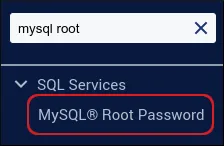
In the search box (top left), type mysql root.
-
Click MySQL Root Password when it appears.
-
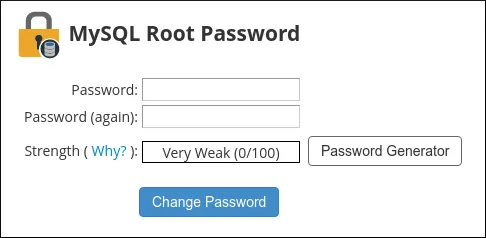
In the Password and Password (again) fields, enter the new password.
- Alternatively, click Password Generator to create a strong, random password.
-
Click Change Password. The new MySQL root password takes effect immediately.
Verifying the Change
Section titled “Verifying the Change”-
Try connecting to MySQL from the command line:
Terminal window mysql -u root -p -
Enter the new password when prompted.
-
If successful, you’ll gain access to the MySQL shell.